Best React scheduler components

A React scheduler component displays resources alongside a time axis, with events placed on a timeline for each resource. It is different from a Gantt chart, which focuses on task bars with dependencies and a work breakdown structure, and from a calendar, which shows personal appointments in day, week, or month views. Common scheduler use cases include equipment scheduling, staff rostering, room booking, and dispatch management.
This comparison covers five React resource scheduler libraries: Bryntum Scheduler, DHTMLX Scheduler, Syncfusion Schedule, DayPilot Scheduler, and Mobiscroll Event Calendar. The criteria are installation, React integration, timeline features, resource scheduling features, pricing, and trade-offs.
Vendor naming is inconsistent. Syncfusion calls its resource timeline component Scheduler or Schedule, and Mobiscroll calls its equivalent Event Calendar with a timeline view. For a broader comparison that also covers non-React contexts, see our guide to the best JavaScript scheduler components.
Bryntum Scheduler
Bryntum Scheduler is a commercial resource scheduler built on vanilla JavaScript with a dedicated React wrapper package. It is part of the broader Bryntum suite of scheduling and project management components. You can explore the full range of capabilities in the Bryntum Scheduler demos.
Bryntum also has a Scheduler Pro that extends the base scheduler with a reactive scheduling engine, travel time, and task constraints.
Getting started with Bryntum Scheduler
Install the trial package from the public npm registry along with the React wrapper:
npm install @bryntum/scheduler@npm:@bryntum/scheduler-trial@7.3.0
npm install @bryntum/scheduler-react@7.3.0
CSS imports must appear in this specific order. The FontAwesome stylesheets must come first because the toolbar icons depend on them. The core scheduler.css file follows, and the theme file comes last so its variables override the defaults correctly:
import '@bryntum/scheduler/fontawesome/css/fontawesome.css';
import '@bryntum/scheduler/fontawesome/css/solid.css';
import '@bryntum/scheduler/scheduler.css';
import '@bryntum/scheduler/svalbard-light.css';
The BryntumScheduler component accepts a config object spread as props. The resources array defines the rows on the Y-axis, the events array places event bars on the timeline, and columns defines the resource grid on the left:
import { BryntumScheduler } from '@bryntum/scheduler-react';
import { useState } from 'react';

const App = () => {
    const [config] = useState({
        startDate  : '2025-05-07',
        endDate    : '2025-05-26',
        viewPreset : 'hourAndDay',
        columns    : [{ text : 'Name', field : 'name', width : 130 }],
        resources  : [
          { id : 1,  name : 'Celia',          title : 'Sales' },
          { id : 11, name : 'Fancy law firm', eventColor : 'teal' },
          { id : 12, name : 'Small boutique', eventColor : 'blue' },
          { id : 13, name : 'Grocery store',  eventColor : 'lime' }
        ],
        events     : [
          { id : 1, resourceId : 1,  name : 'Busy',              startDate : '2025-05-07', endDate : '2025-05-09', eventColor : 'red' },
          { id : 2, resourceId : 11, name : 'Meeting',           startDate : '2025-05-07', endDate : '2025-05-09', location : 'clients office' },
          { id : 3, resourceId : 12, name : 'Phone',             startDate : '2025-05-07', endDate : '2025-05-08', location : 'office' },
          { id : 4, resourceId : 13, name : 'Suggested meeting', startDate : '2025-05-09', endDate : '2025-05-11', location : 'grocery store' }
        ]
    });
    return <BryntumScheduler {...config} />;
};
For server-backed data, configure a CrudManager directly in the config. The CrudManager handles loading and syncing through a JSON protocol so you do not need to write manual fetch logic:
crudManager : {
    loadUrl  : '/api/load',
    syncUrl  : '/api/sync',
    autoLoad : true,
    autoSync : true
}
Bryntum ships 10 themes across five light/dark pairs. To switch themes, replace the theme CSS import.
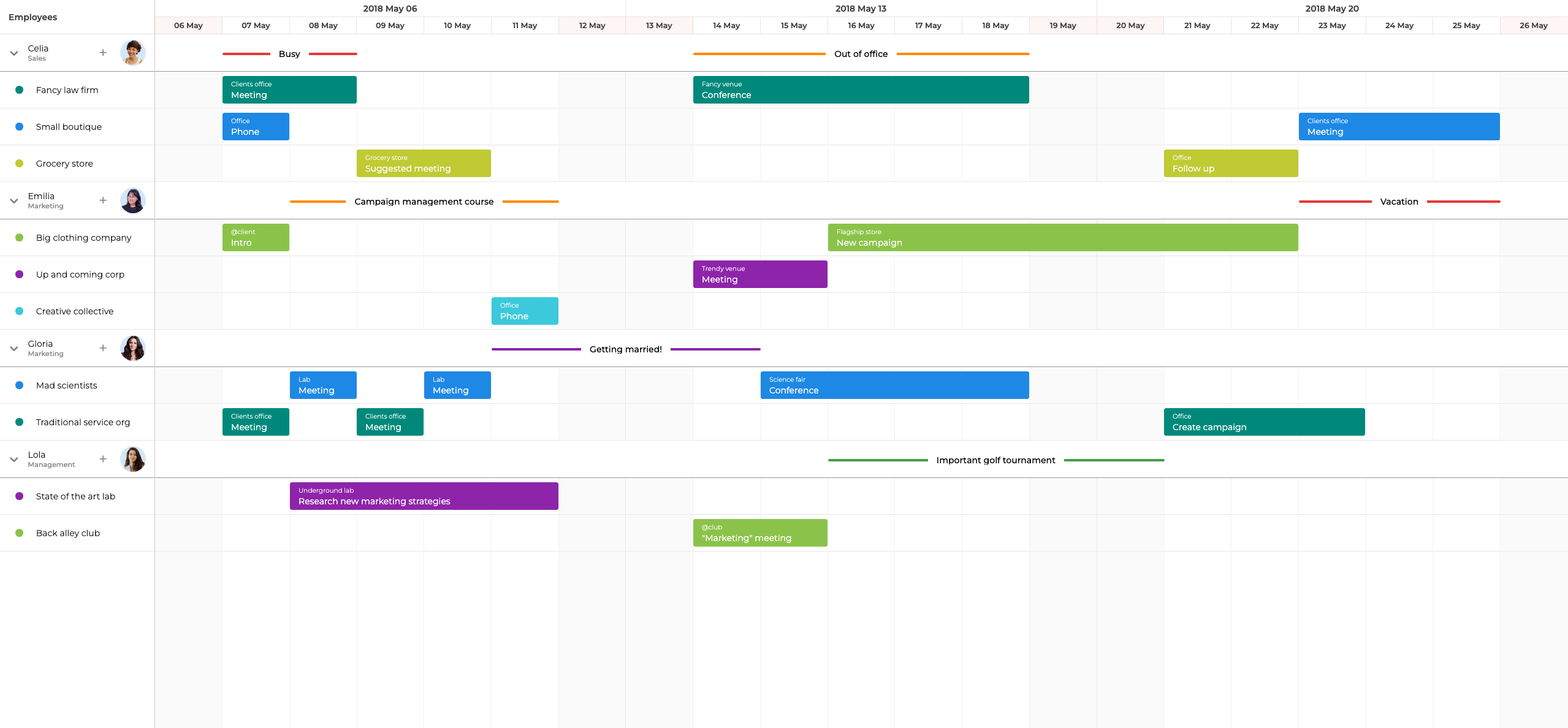
Bryntum Scheduler features
- Multi-resource assignments: a single event can be assigned to more than one resource
- Event overlap detection and configurable stacking behavior
- Drag-and-drop scheduling, event resizing, and a built-in event editor dialog
- Recurring events
- Vertical and horizontal resource grouping
- 18 built-in view presets (hourAndDay, weekAndDay, monthAndYear, and more)
- Virtual scrolling for large datasets with minimal DOM footprint
- MCP server for AI-assisted development tooling
- 10 themes (five light/dark pairs)
- Bryntum Scheduler Pro adds travel time, scheduling constraints, and the ChronoGraph reactive scheduling engine
Bryntum Scheduler pricing
Bryntum Scheduler is priced from $680 per developer for the small-team license, with a three-developer minimum and 12 months of updates. Scheduler Pro is priced separately. Check bryntum.com for current pricing. A trial version is available through npm as shown in the installation instructions above.
Pros of Bryntum Scheduler
- The React wrapper is a first-class package maintained in lockstep with the core library, not a community adapter.
- 18 built-in view presets cover nearly every resource scheduling layout without configuration.
- Virtual scrolling and a minimal DOM footprint make it suitable for large resource and event datasets.
- The MCP server integration allows AI coding tools to access Bryntum's documentation and API directly.
- Comprehensive documentation includes live demos with editable code, integration guides, and migration guides from competing libraries.
- Bryntum Scheduler Pro is a drop-in upgrade path when you need a scheduling engine or travel time features.
Cons of Bryntum Scheduler
Bryntum Scheduler has no free or open-source tier. The three-developer minimum can be difficult to justify for small teams building simple resource views. The learning curve for the configuration API is steeper than lighter-weight alternatives.
DHTMLX Scheduler
DHTMLX Scheduler is a calendar and scheduling component that offers multiple views. For resource scheduling, the Timeline view places resources on the Y-axis and a time axis on the X-axis. The Timeline view and advanced views require the PRO edition.
DHTMLX Scheduler is a global singleton rather than a React component, so it must be initialized manually inside a React component using a container ref and a useEffect hook.
Getting started with DHTMLX Scheduler
Install the package from npm:
npm install dhtmlx-scheduler
Because DHTMLX Scheduler is a global singleton, you call scheduler.init() to attach it to a DOM node and scheduler.parse() to load data. Both calls go inside a useEffect so they run after the component mounts. Clean up by calling scheduler.destructor() in the effect's return function:
import { useEffect, useRef } from 'react';
import 'dhtmlx-scheduler/codebase/dhtmlxscheduler_material.css';
import scheduler from 'dhtmlx-scheduler';

const DHtmlxScheduler = () => {
    const containerRef = useRef<HTMLDivElement>(null);

    useEffect(() => {
        scheduler.config.xml_date = '%Y-%m-%d %H:%i';

        // Configure Timeline view for resource scheduling
        scheduler.createTimelineView({
            name      : 'timeline',
            x_unit    : 'hour',
            x_date    : '%H:%i',
            x_step    : 1,
            x_size    : 8,
            x_start   : 8,
            x_length  : 8,
            y_unit    : scheduler.serverList('people'),
            y_property: 'section_id',
            render    : 'bar'
        });

        scheduler.init(containerRef.current!, new Date(2026, 0, 2), 'timeline');
        scheduler.serverList('people', [
            { key : '1', label : 'Alice' },
            { key : '2', label : 'Bob' }
        ]);
        scheduler.parse([
            { id: 1, text: 'Meeting', start_date: '2026-01-02 10:00', end_date: '2026-01-02 12:00', section_id: '1' },
            { id: 2, text: 'Workshop', start_date: '2026-01-04 09:00', end_date: '2026-01-04 17:00', section_id: '2' }
        ]);

        return () => scheduler.destructor();
    }, []);

    return (
        <div
            ref={containerRef}
            style={{ width : '100%', height : '100vh' }}
        />
    );
};
The Timeline view is configured by calling scheduler.createTimelineView() before scheduler.init(). Resources are registered as a named server list using scheduler.serverList(), and events reference the resource key through the property set in y_property.
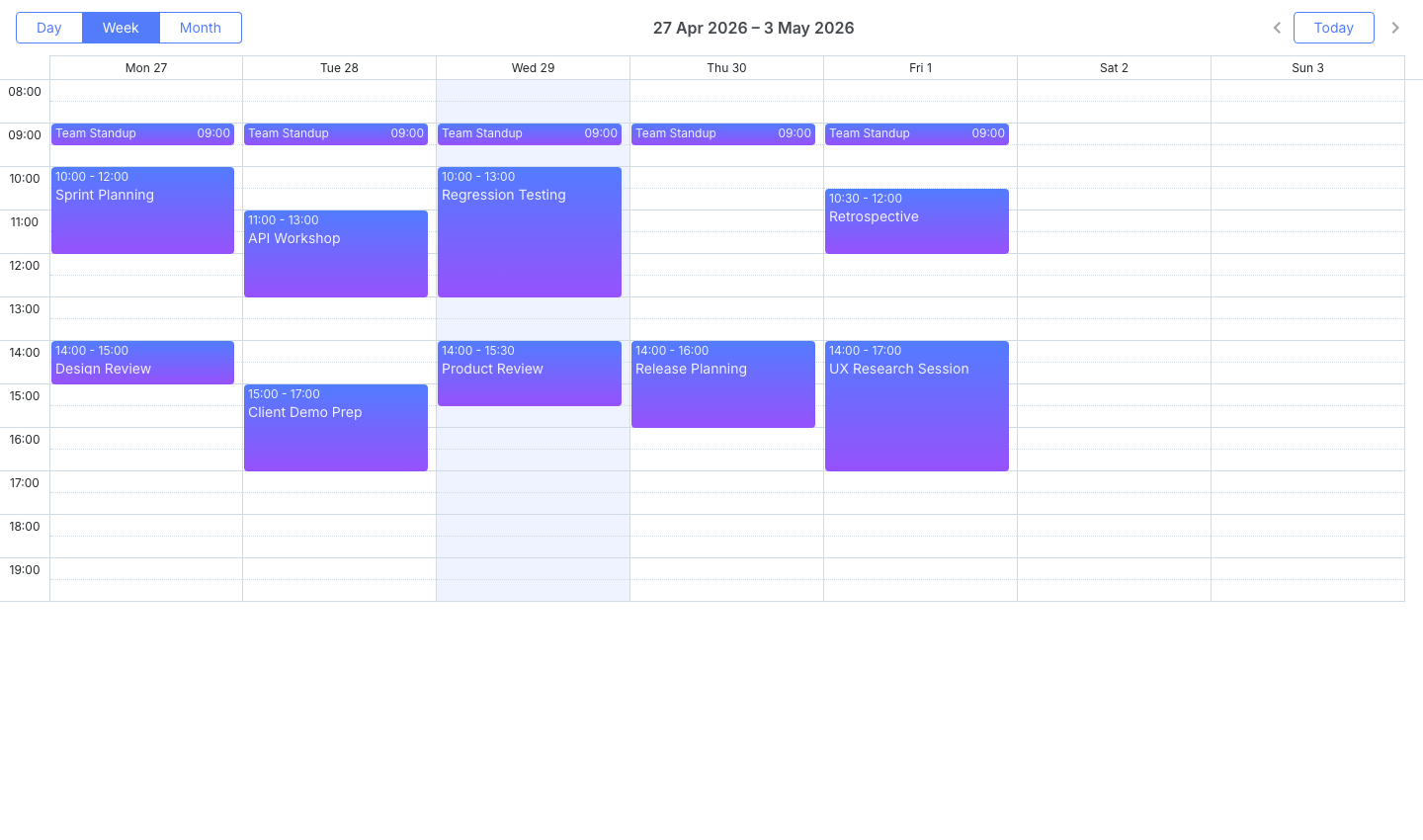
DHTMLX Scheduler features
- Multiple calendar views: day, week, month, year, and agenda
- Timeline view for resource scheduling (PRO edition)
- Recurring events
- Touch support for mobile browsers
- Server-side data loading helpers via the DataProcessor API
- Connectors for PHP, Java, and .NET backends
- No built-in scheduling engine
DHTMLX Scheduler pricing
The Standard edition is free for GPL-compatible open-source projects. The PRO edition, which includes the Timeline view, is priced at $599 to $3,999 perpetual depending on team size. A 30-day free trial of the PRO edition is available.
Pros of DHTMLX Scheduler
- A free Standard edition exists for open-source projects, making it accessible at zero cost for qualifying use cases.
- Server-side DataProcessor connectors reduce the boilerplate required to sync scheduler changes to PHP, Java, and .NET backends.
- The wide range of calendar views means the same library covers both personal calendar and resource scheduling requirements.
- Comprehensive samples and demos include source code.
Cons of DHTMLX Scheduler
DHTMLX Scheduler is not a React component. Integrating it into a React application requires a container ref and a useEffect setup, which works against React's declarative model and can cause issues in strict mode with double-invocation of effects. The Timeline view (required for resource scheduling) is locked behind the PRO edition. The default skins look dated compared to more modern alternatives. The documentation mixes old and new API references, and the search functionality does not reliably surface relevant results.
Syncfusion Schedule
Syncfusion provides a suite of UI components for React, Angular, Vue, and Blazor. Their resource timeline component is called "Scheduler" or "Schedule" and is accessed through ScheduleComponent with TimelineViews. We use this component with the TimelineDay and TimelineWeek views to get resource scheduling behavior.
Getting started with Syncfusion Schedule
Install the React schedule package:
npm install @syncfusion/ej2-react-schedule
Syncfusion uses a module injection pattern. You must import and inject the view modules you want to use. Several peer packages must also be imported for their CSS. Import them in this order before any component CSS:
import '@syncfusion/ej2-base/styles/material.css';
import '@syncfusion/ej2-buttons/styles/material.css';
import '@syncfusion/ej2-calendars/styles/material.css';
import '@syncfusion/ej2-dropdowns/styles/material.css';
import '@syncfusion/ej2-inputs/styles/material.css';
import '@syncfusion/ej2-navigations/styles/material.css';
import '@syncfusion/ej2-popups/styles/material.css';
import '@syncfusion/ej2-react-schedule/styles/material.css';
Call registerLicense() before any Syncfusion component mounts. Then declare resources and events as plain objects and pass them to ScheduleComponent through declarative directive children:
import { registerLicense } from '@syncfusion/ej2-base';
import {
    ScheduleComponent, TimelineViews, TimelineMonth, Inject,
    ResourcesDirective, ResourceDirective, ViewsDirective, ViewDirective
} from '@syncfusion/ej2-react-schedule';

registerLicense('YOUR_LICENSE_KEY');

const resourceData = [
    { text : 'Alice', id : 1 },
    { text : 'Bob', id : 2 }
];

const eventData = [
    { Id : 1, Subject : 'Meeting', StartTime : new Date(2026, 0, 2, 10), EndTime : new Date(2026, 0, 2, 12), ResourceId : 1 },
    { Id : 2, Subject : 'Workshop', StartTime : new Date(2026, 0, 4, 9), EndTime : new Date(2026, 0, 4, 17), ResourceId : 2 }
];

const App = () => (
    <ScheduleComponent height="550px" selectedDate={new Date(2026, 0, 2)} eventSettings={{ dataSource : eventData }}>
        <ResourcesDirective>
            <ResourceDirective
                field="ResourceId" title="Resource" name="Resources"
                dataSource={resourceData} textField="text" idField="id"
            />
        </ResourcesDirective>
        <ViewsDirective>
            <ViewDirective option="TimelineDay" />
            <ViewDirective option="TimelineWeek" />
        </ViewsDirective>
        <Inject services={[TimelineViews, TimelineMonth]} />
    </ScheduleComponent>
);
Syncfusion provides 13 themes and a Theme Studio GUI that lets you customize colors visually and download the resulting CSS.
Syncfusion Schedule features
- Timeline day, week, and month views for resource scheduling
- Drag-and-drop event scheduling and resizing
- Inline event editing
- Recurring events
- Resource grouping with multi-level hierarchy
- Virtual scrolling for large datasets
- Export to PDF and Excel
- 13 themes with a visual Theme Studio editor
- Community License available for qualifying organizations
Syncfusion Schedule pricing
A Community License is available free of charge for organizations with annual gross revenue under $1 million and fewer than five developers. Commercial licensing is quote-based. Contact Syncfusion for pricing. A 30-day free trial is available.
Pros of Syncfusion Schedule
- The Community License makes the full feature set free for small teams and startups that meet the revenue and team size thresholds.
- The Theme Studio GUI allows non-developers to customize the component's appearance without writing CSS.
- The declarative
ResourcesDirectiveandViewsDirectiveAPI fits naturally into JSX. - Export to PDF and Excel is available out of the box.
- The demos page includes live code and StackBlitz links.
Cons of Syncfusion Schedule
The module injection pattern adds boilerplate: you must import and inject every view or feature you use, and forgetting a single import silently disables the feature. Commercial pricing is not publicly listed, which makes budget planning difficult. The docs search frequently returns results for other Syncfusion components rather than the Schedule. The component lacks undo/redo functionality out of the box.
DayPilot Scheduler
DayPilot offers a dedicated resource scheduler component with a React wrapper. It is part of the DayPilot Pro commercial suite. A free Lite version is available for evaluation and basic use, but it has limited functionality compared to the Pro version.
Getting started with DayPilot Scheduler
Install the Pro package:
npm install daypilot-pro-react
For evaluation, use the public Lite package instead:
npm install @daypilot/daypilot-lite-react
The DayPilotScheduler component accepts a config object spread as props. Resources map to rows, and events reference a resource by its id field through the resource property:
import { DayPilotScheduler } from 'daypilot-pro-react';
import { useState } from 'react';

const App = () => {
    const [config] = useState({
        startDate  : '2026-01-01',
        days       : 7,
        scale      : 'Hour',
        cellWidth  : 40,
        resources  : [
            { name : 'Alice', id : 'R1' },
            { name : 'Bob',   id : 'R2' }
        ],
        events     : [
            { id : 1, text : 'Meeting', start : '2026-01-02T10:00:00', end : '2026-01-02T12:00:00', resource : 'R1' },
            { id : 2, text : 'Workshop', start : '2026-01-04T09:00:00', end : '2026-01-04T17:00:00', resource : 'R2' }
        ]
    });
    return <DayPilotScheduler {...config} />;
};
DayPilot provides a UI Builder that generates configuration code from a visual editor, and a Theme Designer that produces CSS theme files.
DayPilot Scheduler features
- Drag-and-drop event scheduling, resizing, and moving
- Event editing dialog
- Row headers with multi-level hierarchy support
- Multi-day events
- Keyboard navigation
- UI Builder for visual configuration
- Theme Designer for CSS theme customization
- No built-in scheduling engine
DayPilot Scheduler pricing
DayPilot Pro starts at $899 per developer. The Lite version is free with limited features. A 60-day free trial of the Pro version is available.
Pros of DayPilot Scheduler
- The UI Builder generates working configuration code, which speeds up initial setup.
- The Theme Designer lowers the effort required to match a custom brand's visual style.
- The Lite version provides a no-cost starting point for prototyping and simple projects.
- Documentation includes integration examples for ASP.NET and Java backends in addition to JavaScript frameworks.
Cons of DayPilot Scheduler
The default UI and the available themes look less polished than those of other schedulers in this list. Producing a modern appearance requires significant CSS work. DayPilot Scheduler does not include advanced features such as filtering, undo/redo, or virtual scrolling for large datasets. At $899 per developer, it is the most expensive option in this comparison while offering a smaller feature set than Bryntum.
Mobiscroll Event Calendar
Mobiscroll is a mobile-first UI component library. Their resource scheduling component is called "Event Calendar" and uses a timeline view type inside the Eventcalendar component. Mobiscroll does not call this a scheduler. The timeline view is one of several view types available on the same component.
Getting started with Mobiscroll Event Calendar
Install the React package:
npm install @mobiscroll/react
Mobiscroll requires a license. A free trial is available at mobiscroll.com. The Eventcalendar component takes a view prop that controls which view type is active. Setting timeline.type to 'week' enables the resource timeline view. Resources are typed as MbscResource[] and events as MbscCalendarEvent[]:
import { Eventcalendar, MbscCalendarEvent, MbscResource } from '@mobiscroll/react';
import '@mobiscroll/react/dist/css/mobiscroll.min.css';

const myResources: MbscResource[] = [
    { id : 1, name : 'Alice' },
    { id : 2, name : 'Bob' }
];

const myEvents: MbscCalendarEvent[] = [
    { id : 1, resource : 1, title : 'Meeting', start : '2026-01-02T10:00:00', end : '2026-01-02T12:00:00' },
    { id : 2, resource : 2, title : 'Workshop', start : '2026-01-04T09:00:00', end : '2026-01-04T17:00:00' }
];

const App = () => (
    <Eventcalendar
        view={{ timeline : { type : 'week', eventList : false } }}
        data={myEvents}
        resources={myResources}
    />
);
Mobiscroll provides three built-in themes (iOS, Material, and Windows), each with light and dark variants. A theme builder allows custom color palettes to be previewed and downloaded.
Mobiscroll Event Calendar features
- Timeline view with resources on the Y-axis
- Drag-and-drop scheduling and resizing
- Recurring events
- Mobile-first design with touch-optimized gestures and responsive layouts
- Customizable event rendering using render props
- Three built-in themes with light and dark variants plus a theme builder
- Multiple view types on the same component: calendar, scheduler, timeline, and agenda
Mobiscroll Event Calendar pricing
Mobiscroll Event Calendar starts at $995 per internal project as a perpetual license. A free trial is available at mobiscroll.com.
Pros of Mobiscroll Event Calendar
- Mobile-first design with large tap targets and adaptive layouts makes it the strongest choice for applications with a high proportion of mobile users.
- The single
Eventcalendarcomponent covers calendar, agenda, and timeline views, reducing the number of dependencies needed in a project that requires multiple scheduling views. - Three built-in themes with a visual theme builder make styling fast.
- TypeScript types (
MbscResource,MbscCalendarEvent) are included in the package. - Touch gesture support is more polished than in desktop-first alternatives.
Cons of Mobiscroll Event Calendar
Mobiscroll SaaS and multi-customer product pricing requires a custom quote. The feature set for pure resource scheduling is narrower than Bryntum or Syncfusion: there is no built-in scheduling engine, no undo/redo, and fewer view presets.
Conclusion
The table below compares key features across the five libraries:
| Feature | Bryntum Scheduler | DHTMLX Scheduler | Syncfusion Schedule | DayPilot Scheduler | Mobiscroll Event Calendar |
|---|---|---|---|---|---|
| Resource grouping | Yes | Yes (PRO) | Yes | Yes | Yes |
| Multi-level resources | Yes | Yes (PRO) | Yes | Yes | Yes |
| Event overlap/stacking | Yes | Yes (PRO) | Yes | Yes | Yes |
| Drag-and-drop | Yes | Yes (PRO) | Yes | Yes | Yes |
| Recurring events | Yes | Yes | Yes | Yes | Yes |
| Virtual scrolling for large datasets | Yes | No | Yes | No | No |
| React native wrapper | Yes | No | Yes | Yes | Yes |
| Free tier | No | Yes (Standard, GPL only) | Yes (Community License) | Yes (Lite, limited) | No |
The table below matches common use cases to the most suitable library:
| Use case | Best choice |
|---|---|
| Enterprise resource scheduling with large datasets | Bryntum Scheduler |
| Small team or startup that qualifies for a free tier | Syncfusion Schedule (Community License) or DHTMLX Standard |
| Mobile-first or tablet-heavy application | Mobiscroll Event Calendar |
| Simple resource view with a low upfront cost | DayPilot Lite or DHTMLX Standard |
Bryntum Scheduler has the most complete feature set of the five libraries. Virtual scrolling, 18 view presets, multi-resource assignments, and the MCP server integration set it apart at the enterprise level. Teams that need auto-scheduling or travel time can upgrade to Scheduler Pro without changing their codebase.
Syncfusion Schedule is the most accessible option for small teams. The Community License provides the full commercial feature set at no cost for organizations that qualify. The declarative JSX API and built-in export to PDF and Excel make it a practical choice for internal tooling.
Mobiscroll Event Calendar is the right choice when the primary audience uses mobile devices. No other library in this comparison matches its touch interaction quality and responsive layout behavior. DayPilot and DHTMLX Standard are suitable starting points when budget is the primary constraint, though both require an upgrade to unlock the full resource scheduling feature set.
If you are considering moving from one of these libraries to Bryntum, we provide step-by-step migration guides: